by Cesar Navas
A vulnerability scan that cannot log in still finishes and still produces a report. But the scan sees only what an outsider sees, so missing patches, installed software, and local configuration go unchecked, and the asset can look healthier than the asset really is.
Authenticated scanning provides the access needed for many local security checks and helps organizations build a clearer understanding of their exposure. Tenable Security Center collects plugin findings that can help administrators investigate authentication, privileges, and scan health across their environment. Reviewing these findings supports more effective troubleshooting of credentialed scans and local checks.
With valid credentials, Tenable scanners log in to an asset and run local checks directly against the operating system and installed software. For security teams, this access delivers four benefits:
- Deeper visibility. Local checks find missing patches, vulnerable software, and misconfigurations that network-only probing cannot reliably detect.
- More accurate findings. Reading patch and software state directly reduces reliance on banner-based detection.
- Better prioritization. Richer asset data gives remediation decisions more context.
- Audit-ready evidence. Many configuration and compliance checks, including those aligned to CIS, PCI DSS, and NIST, require local access.
An asset may report both successful and failed authentication across different services or protocols. Security teams can review the findings in context, investigate enabled services and credentials, and address issues that may affect the information collected during scans.
Credentials expire, accounts lock, privileges change, and services get reconfigured. Scans rarely fail loudly when these changes happen. Scans complete with reduced coverage, and the gap goes unnoticed until someone asks why a critical patch never appeared. Monitoring authentication outcomes turns this blind spot into a prioritized work queue.
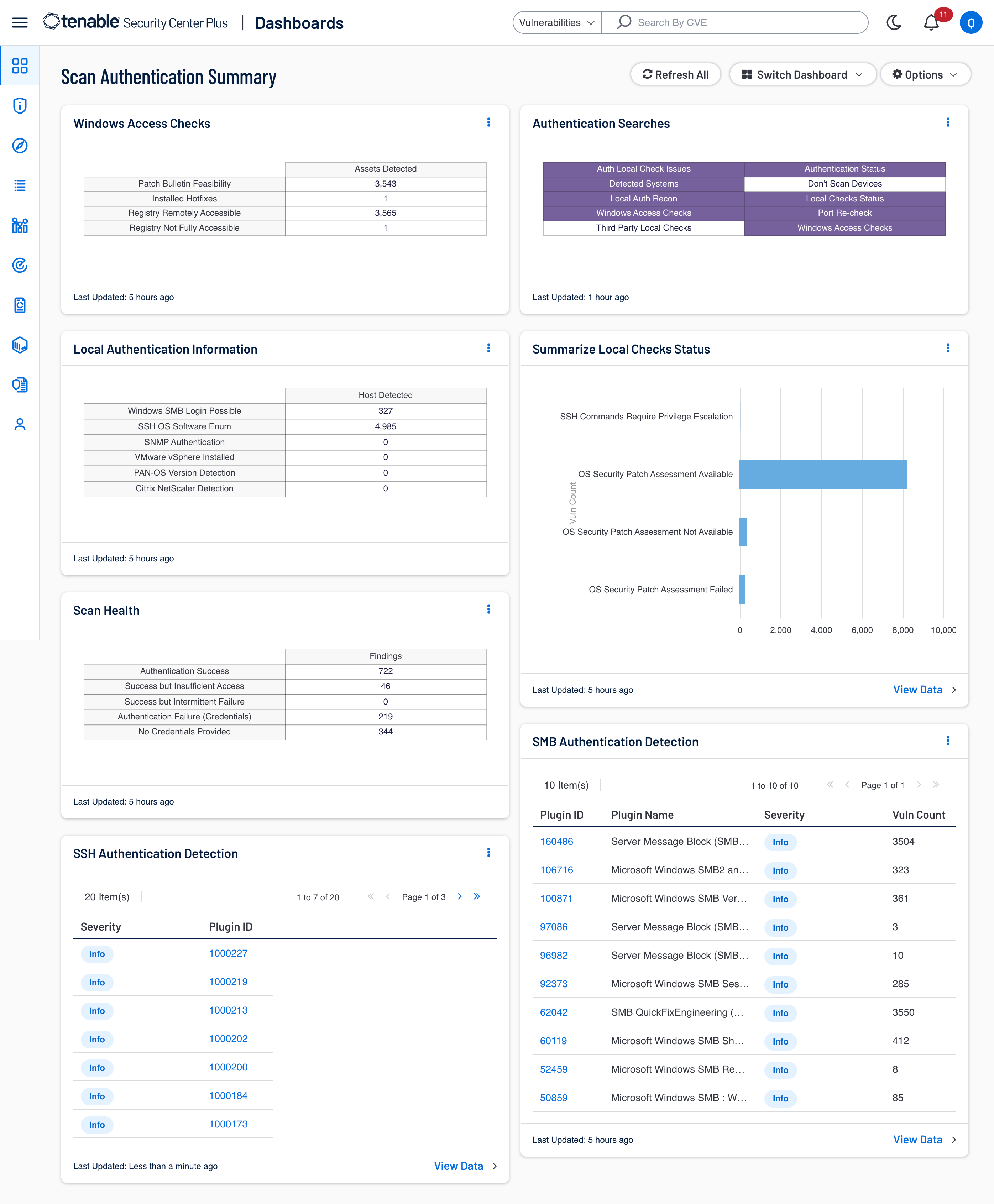
This dashboard brings together selected cumulative findings for Windows access checks, authentication searches, local authentication, scan health, and local-check status. SSH and SMB name-based views can include findings beyond authentication, and the SMB view is limited to informational findings. Most queries exclude accepted risks and mitigated findings, while two Authentication Searches queries do not apply those exclusions. Use these components to prioritize authentication troubleshooting and improve scan visibility across the environment.
Components
SMB Authentication Detection - Groups cumulative informational findings by vulnerability when the plugin name matches *smb*. Accepted risks and mitigated findings are excluded.
Summarize Local Checks Status v2 - Groups cumulative findings by vulnerability for plugin IDs 21745, 102094, 117886, 110695, and 117887, which relate to local-check status and reported issues.
Authentication Searches - Matrix of selected cumulative plugin-ID queries for investigating authentication and scan health.
SSH Authentication Detection - Lists cumulative findings whose plugin name matches *SSH*, excluding accepted risks and mitigated findings.
Scan Health - Matrix of selected cumulative authentication-related plugin findings, organized into scan-health categories including successful authentication, insufficient access, intermittent failure, credential failure, and missing credentials.
Local Authentication Information - Matrix of cumulative findings for selected plugins associated with local authentication and device information, including SMB, SSH, SNMP, VMware, PAN-OS, and Citrix check
Windows Access Checks - Matrix of cumulative findings for plugin IDs 57033, 13855, 10400, and 10428, used to investigate Windows access checks relevant to local scanning.
Tenable One
Request a demo
The world’s leading AI-powered exposure management platform.
Thank You
Thank you for your interest in Tenable One.
A representative will be in touch soon.
Form ID: 7469
Form Name: one-eval
Form Class: c-form form-panel__global-form c-form--mkto js-mkto-no-css js-form-hanging-label c-form--hide-comments
Form Wrapper ID: one-eval-form-wrapper
Confirmation Class: one-eval-confirmform-modal
Simulate Success